SmartDraw Updates 'Visual Processor'

Graphics software developer SmartDraw has released an update to its presentation tool, SmartDraw VP.

Billed as a "visual processor," SmartDraw VP provides tools that are designed to automate the process of creating visual elements, such as charts, calendars, and flow diagrams. These automated tools create and link the various elements of a chart through single-click or single-keystroke interaction. The software supports 70 types of visual elements, ranging from pie charts to floorplans. It also integrates with Microsoft Office, allowing users to bring their completed visual elements into PowerPoint, Word, Excel, or Outlook with the click of a button. Documents can also be shared through Microsoft Project.

The latest version, released this week, includes several new features and workflow enhancements, including document linking capabilities, which allow users to separate portions of complex visuals (such as detailed flowcharts) into individual documents that are hyperlinked to the original.

Other new features include:

  • Custom template categories for managing templates and creating custom categories for working with related templates;
  • A new Collections feature tat allows users to manage multiple documents as a single group, including sharing and printing those groups with a single command; and
  • Automatic saving and recovery of unsaved files.
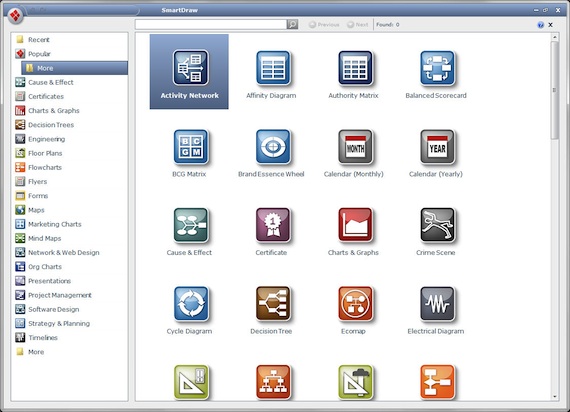
The SmartDraw VP September update adds new template capabilities, including the ability to customize template categories.

The new version of SmartDraw VP is available now. Student pricing starts at $99 for individual seats. Volume licenses are available for academic institutions. Further information on licensing options can be found here.

About the Author

David Nagel is the former editorial director of 1105 Media's Education Group and editor-in-chief of THE Journal, STEAM Universe, and Spaces4Learning. A 30-year publishing veteran, Nagel has led or contributed to dozens of technology, art, marketing, media, and business publications.

He can be reached at [email protected]. You can also connect with him on LinkedIn at https://www.linkedin.com/in/davidrnagel/ .


Featured

  • elementary school students using laptops displaying AI symbols and educational icons in a colorful classroom setting

    Khan Academy Revamps Platform for School Districts

    Khan Academy has reimagined its Khan Academy Districts platform, the paid partnership program that offers strategic implementation tools, data, and services for optimizing the use of Khan Academy district-wide.

  • file folder with glowing cloud symbol

    95% of IT Leaders Encounter Unexpected Cloud Storage Costs

    A recent report from Backblaze found nearly all large organizations face hidden cloud storage charges that limit flexibility and drive data lock-in.

  • Red alert symbols and email icons floating in a dark digital space

    Report: Cyber Attackers Are Fully Embracing AI

    According to Google Cloud's 2026 Cybersecurity Forecast, AI will become standard for both cyber attackers and defenders, with threats expanding to virtualization systems, blockchain networks, and nation-state operations.

  • open laptop with data streams

    OpenAI Launches AI-Powered Web Browser

    OpenAI has unveiled ChatGPT Atlas, a standalone browser that places ChatGPT at the heart of everyday web activity. This release represents a major expansion of the company's efforts to reshape how users search, browse, and complete tasks online.