NComputing Launches Chromebook CX110 and Chrome App, Offering Windows
NComputing has launched the Chromebook CX110 and Chrome app, paving the way for American schools to easily run Windows applications on their Chromebooks.
About half of all computers purchased by U.S. K-12 schools last year were Chromebooks, according to a recent report by Futuresource Consulting. Now NComputing Chromebooks, with the vSpace client, should provide easy, multi-user access to the Windows, Java or Silverlight applications frequently necessary for learning and testing applications.
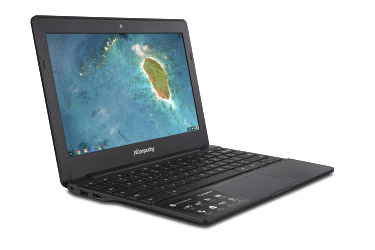
NComputing's Chromebook CX110
With the vSpace software, users should be able to call up as many as 100 individual Windows desktops on a single computer. Students and teachers should be able to use a single Chromebook to access all of their ChromeOS and Windows applications.
“Our U.S. customers have been demanding we provide a solution that enables them to run Windows on their Chromebooks,” said Young Song, CEO of NComputing, in a prepared statement. “The NComputing Chromebook CX110, together with our vSpace Client for Chromebooks, means we can now deliver a Windows PC-like experience on your Chromebook — and help millions of students and teachers have a better classroom experience.”
Other key features of the NComputing Chromebook CX110 with vSpace include:
- 11.6-inch IPS LCD panel — to provide the best Chromebook viewing experience for students in the classroom;
- Quick to start — takes less than 10 seconds to go from off to full-speed;
- Secure — built-in security is designed to keep students safe from viruses, malware and other computer threats;
- Battery life — quad-core CPU with long battery life that lasts up to 8.5 hours (depending on actual usage);
- Always updating — unlike a traditional computer, it shouldn’t slow down over time, and updates are automatic;
- vSpace Client for Chromebook — a Chrome app that can be installed from the Chrome Web Store, which gives users access to a virtualized Windows desktop and comes with a one-year free license to vSpace virtualization software (MSRP: $50);
- Managed Windows desktops — with vSpace software, students and teachers gain access to centrally managed Windows desktops while being able to take advantage of the benefits of Chromebook as a platform for student computing needs;
- Full Windows desktop experience — with vSpace software, a genuine Windows PC-like experience should be delivered to students and teachers in the classroom;
- “Sandboxed” kiosk mode — prevents students from exiting testing applications, so students should not be able to search the Internet to find answers during tests;
- Educational content — Free one-year subscription to Brightstorm.com with access to over 6,000 HD video lessons in math, science, English and AP subjects plus ACT prep.
The NComputing Chromebook is available for the North American education market for an MSRP of $229, which includes a one-year subscription to the vSpace client for Chromebook and Brightstorm.com.
NComputing will begin accepting pre-orders today, with product availability in June.
About the Author
Richard Chang is associate editor of THE Journal. He can be reached at [email protected].