Free Chrome Plugin Pinpoints Non-Accessible Web Content
- By Dian Schaffhauser
- 09/19/19
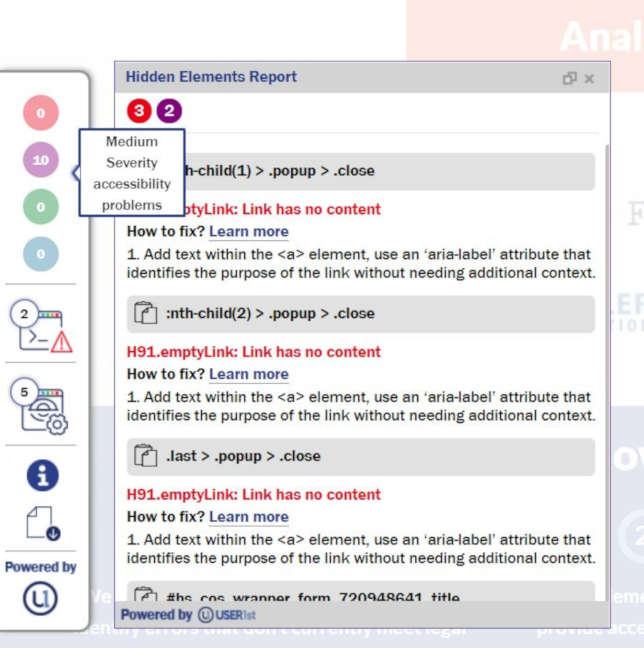
A new plugin for Google Chrome helps users identify web content that isn't accessible. The uTester Developer Plugin from User1st specifically highlights content that doesn't comply with Web Content Accessibility Guidelines (WCAG) 2.1.
Along with pointing out each web accessibility issue, the program offers an explanation of the accessibility guideline being violated, information about the severity of the issue and links to guidelines for fixing the problem. It also includes a function for extracting and linking the results of automated scans to other systems the developers might be using.
"Web accessibility is akin to cyber security--it needs to be thought of as a continuous process, because websites are always changing as new pages and content are developed, and site function or navigation changes," said Matt Triner, chief product officer of User1st, in a statement. "Web accessibility means continuous upkeep, and it's why it needs to be an integral part of each and every web development cycle to ensure that all the moving parts of a website are manageable for both companies and people with disabilities."
The uTester Developer Plugin is freely available at the Google Chrome Web Store. To use the tool, users need to create a free User1st account.
About the Author
Dian Schaffhauser is a former senior contributing editor for 1105 Media's education publications THE Journal, Campus Technology and Spaces4Learning.