Elementary Ergonomics
##AUTHORSPLIT##<--->
With the use of digital devices occupying a central role in students' lives, what was
a workplace issue long ignored by schools now demands their attention.
 WHAT'S THE NO. 1 THREAT to young students
using computers today? According to Dan Odell, Microsoft's in-house ergonomist, when he asked parents
this very question, "the things they were most concerned
about were online predators and people taking advantage of
their kids. Ergonomics was fairly far down the list."
WHAT'S THE NO. 1 THREAT to young students
using computers today? According to Dan Odell, Microsoft's in-house ergonomist, when he asked parents
this very question, "the things they were most concerned
about were online predators and people taking advantage of
their kids. Ergonomics was fairly far down the list."
Unfortunately, that same lack of regard for ergonomics
can be found among educators as well. Ask one and you're
almost sure to be met by a confession that the topic rates as
a low priority in most schools.
Perhaps it's the dry tone of the word itself that is to blame.
Ergonomics, or the discipline of arranging the environment to
fit the person in it, doesn't sound terribly exciting. But with
as much time as we now spend on computers, Odell believes
it is more relevant than ever. "If we're not conscious of using
computers appropriately," he says, "we put ourselves at risk
for potentially disabling injuries."
Ergonomics has long been considered essential in the
workplace for avoiding visual and musculoskeletal injury and
discomfort, and Odell sees K-12 coming on board.
"There is a growing awareness of how much of an
impact there is on students. A lot of the ergonomists
I work with at different companies have
been noticing that students are graduating from
college and coming into the workforce already with
chronic repetitive strain-injury problems. It seems
at least from the anecdotal stuff that it's important
to start focusing more on the student population."
Teaching Ergonomics
Susan Murphey, president of Essential Ergonomics, is doing just that.
As community projects chair of the Puget Sound
Human Factors and Ergonomics Society in Washington state, she is heading
a project called Technically Cool Computing. The
program, which she piloted in May at Washington's
Shoreline School District, where her children have
attended school, teaches kids how to evaluate
their computer workstations and work habits to
reduce their risk for musculoskeletal injuries.
Break Time
 BOSTON UNIVERSITY occupational therapy
professor Karen Jacobs offers a free software program
available for download on her website called Stretch Break for Kids, which provides
an external cue to take breaks while working at the computer.
BOSTON UNIVERSITY occupational therapy
professor Karen Jacobs offers a free software program
available for download on her website called Stretch Break for Kids, which provides
an external cue to take breaks while working at the computer.
"When you think of the cumulative effects-- text messaging,
gaming, computer use-- all of that adds up," she says. She
points to her own children. "My daughter as a middle schooler
was building PowerPoints and video presentations… [but she
was] taught absolutely nothing about ergonomics."
The goal of Technically Cool Computing is to determine how
to educate young students about ergonomics in an engaging
way. Murphey believes the way to do that is by giving students
and teachers a kit they can use to examine their own tech
habits. She explains that the goal is to make the kit as plug-and-play as possible, so it can be incorporated anywhere in the
curriculum. "If students have a technology class, it could go
there," she says. "If they don't, it could go in science as they
learn about tendons and muscle."
Each kit contains a low-cost digital camera, graphics on a
transparency to evaluate posture, an instruction worksheet,
and a PowerPoint presentation. The students take photos of
each other, use the transparencies to evaluate each other's
posture in the photos, then adjust their computer workstations accordingly. The kit also addresses other computing environments
that may be less than ideal. This is an important
feature, says Microsoft's Odell, who also volunteers with the
Puget Sound ergonomics group. He cites a Microsoft study,
soon to be published in the journal Work, which found that
students with laptops often use them in unconventional
ways-- "like lying on their stomach on the floor," he says--
which can further predispose them to injury.
Karen Jacobs is the founding editor of Work, which covers
research related to ergonomics and children. She is also a
clinical professor of occupational therapy at Boston University,
where she has been studying how students use notebook
computers. "[Laptops] weren't designed for everyday use,"
Jacobs says. "They were really designed for portability...and so
they're not adjustable," Jacobs says. "Now we've got children
using them on a regular basis. What will that mean?"
She set out to answer that question after coming across the
Maine Learning Technology Initiative, which provides an Apple laptop to every Maine middle schooler and is
now expanding into high schools as well. The result is a study
launched in January that will follow 34 Maine students and
their laptop use from seventh grade through high school graduation.
The students received laptop accessories-- wireless
mouse, notebook riser, keyboard, and mouse pad inscribed with
ergonomics tips-- and are being trained on using the items to
operate the laptops in an ergonomically correct fashion. One
group of students was given standard keyboards; the other
received curved keyboards that promote natural wrist posture.
"We're really interested in how children use computers in
their home," she explains, "because we find that children will
use the computer in multiple areas, like at a desk, a kitchen
table, or a Ping-Pong table; it all depends on the time of day
and what's available to them."
Building a Better Mouse
 IT'S NOT JUST RESEARCHERS who are considering how to implement
ergonomics for young tech users. Companies are starting to hold up
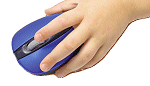
their end. As one example, Microsoft's Explorer
Mini Mouse was developed to fit smaller hand sizes. "If your hand is
very small, you can't rest it on the mouse pad the same way an adult
would," Microsoft ergonomist Dan Odell explains. "So kids wind up
turning the mice sideways in funny ways." Odell says a recent University
of Washington study confirmed the benefits of using a smaller mouse.
IT'S NOT JUST RESEARCHERS who are considering how to implement
ergonomics for young tech users. Companies are starting to hold up
their end. As one example, Microsoft's Explorer
Mini Mouse was developed to fit smaller hand sizes. "If your hand is
very small, you can't rest it on the mouse pad the same way an adult
would," Microsoft ergonomist Dan Odell explains. "So kids wind up
turning the mice sideways in funny ways." Odell says a recent University
of Washington study confirmed the benefits of using a smaller mouse.
A broad spectrum of data is being gathered for the study: A
software program installed in the laptops will record how often
the students use the computers, and a vision specialist will be
monitoring their eyesight. As with Technically Cool Computing,
cameras will be used in the study. Parents will periodically take
photos of their children using their laptops at home, and e-mail
the photos to Jacobs' team. Jacobs is also interested in how
fast the students type and if they touch type; touch typing and
"hunting and pecking" have different postures, she explains.
(Touch typists sit upright, eyes on the screen. Those who hunt
and peck tend to be hunched over, looking down at the keys.)
And finally, the team will be considering anthropometrics: the
study of human body measurements. As the student grows,
will he change the way he sets up his computer?
"It's really important that you try to look at the total picture,"
Jacobs says. "That's what we're trying to do with this study."
Start at the Top
Simply being aware of the role of ergonomics in a healthy
classroom puts Michael McClish ahead of his field, where too
little mind is paid to it. McClish, a technology teacher at Los
Angeles Teacher Preparation High School, says his district's
technology plan lists tech expertise expectations for each
grade, but he can't recall seeing any mention of ergonomics.
Thankfully for his students, McClish doesn't need any prodding
from above. In his computer lab, because the lights have
to be off when a projector is in use, to spare students' eyes
he has scattered a few inexpensive torchiere lamps around the
room. "If [students are] trying to watch their [computer] screen
and the LCD projector, it really is a lot of eyestrain," he says.
McClish suggests polling district computer technology and
programming personnel. "Ask them how many of them took a
keyboarding class to become proficient in keyboard techniques,
including ergonomics, posture, hand positions, etc.
Many programming teachers-- and administrators-- have, shall
we say, less than basic skills and understanding in the area."
According to Jacobs, the key to rectifying K-12's lack of
attention to healthy technology use is by securing a topdown
effort. Only that degree of commitment can help kids
make ergonomics second nature. "Whenever I go into the
principal's office," she says, referring to the school taking
part in her study, "I'm always happy to see that he's applying
ergonomics to his own computer workstation. When you have
a commitment from the administration, then the teachers
become committed, the children are committed, and you get
a pay-it-forward from the parents as well."
Jennifer Grayson is a freelance health and environmental
writer based in Los Angeles.