Quizlet Adds Smart Content Scanning Tool
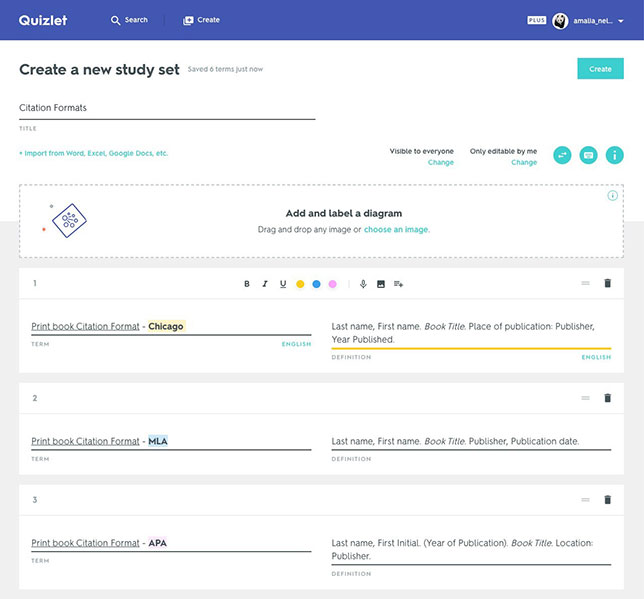
Quizlet study set being created using new rich text features such as bolding, highlighting and italicizing.
Quizlet is introducing new features to provide students with more options for studying. A smart scanning tool allows users to scan their notes with their phones or tablet and create study sets designed for their specific needs.
Using rich text formatting options, users can now highlight main ideas, underline key concepts and bold important study terms to create custom content. Quizlet is aiming to give students new ways to "break down dense information, emphasize important material and better organize comprehensive study sets."
The smart scanning and rich text creation features are available to Quizlet Plus and Quizlet Teacher subscribers.
On Quizlet's free Android and iPhone apps, the company is rolling out an option for students to "swipe flashcards." This feature is designed to help students determine what material that they already know and what they would like to focus on.
"With these new features, Quizlet is making studying more efficient and customizable to give students even more confidence as they prepare to ace their tests this year," said Quizlet CEO Matthew Glotzbach. "Ninety-two percent of our users already say that Quizlet helps them get better grades, but we're always trying to find new ways to help students get those consistent wins and feel successful in their learning journey."
More information about the new features is available on Quizlet's website.
About the Author
 Sara Friedman is a reporter/producer for Campus Technology, THE Journal and STEAM Universe covering education policy and a wide range of other public-sector IT topics.
Friedman is a graduate of Ithaca College, where she studied journalism, politics and international communications.
Friedman can be contacted at [email protected] or follow her on Twitter @SaraEFriedman.
Click here for previous articles by Friedman.