LaunchPad Adds Instructional Design View
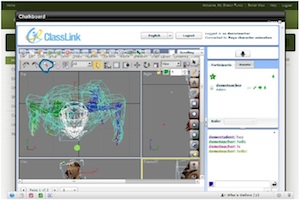
The interactive chalkboard is accessible through the new Instructional Design View in ClassLink LaunchPad |
ClassLink has released LaunchPad Instructional Desktop View, an upgrade to the company's cloud-based virtual desktop software designed for K-12 schools.
LaunchPad is a desktop virtualization tool that allows teachers and students to log in from school-based or remote systems to access all of the schools' available applications in a custom desktop environment. It also includes collaboration tools (chat, desktop sharing), calendars (with support for Apple iCal), a user manager, and file sharing capabilities. The new Instructional Desktop View is a new feature integrated into LaunchPad that lets users toggle between the traditional desktop view and a user interface that acts as a sort of hub for all course-related services and materials, including:
- Class Pages, where instructors can create classes and add students (or allow them to self-enroll);
- Discussions, which are instructor-moderated threaded messages organized by class, with support for embedded links and documents;
- Chalkboard, a real-time collaborative whiteboard and media sharing system with teacher moderation;
- Shared files, a repository of resources shared by a class;
- Drop Box, a place where instructors can collect assignments;
- Calendar;
- GroupType, a collaborative environment with Typewith.me integration; and
- Settings.
LaunchPad Instructional Desktop View is available now as a free and automatic upgrade to users of cloud-based LaunchPad.
ClassLink also indicated that it will soon be adding cloud-based classroom management features to LaunchPad, including the ability to observe, lock, and take shots of students' screens; push the the instructor's screen out to students; view running applications and Web sites; run applications; chat; integrate with Active Directory; and manage users from a browser.
LaunchPad is available on a subscription basis as a fully hosted service or in an on-premises configuration for self-hosting. Further information can be found on ClassLink's site.