Microsoft Loop Collaboration Platform Gets a Revamp

Microsoft Loop, the online collaborative platform in Microsoft 365, is getting an upgrade with new features and an overall redesign.

In a series of tweets on X, Microsoft announced some of the new changes coming to what it's calling Loop 2.0. The most noticeable change is a more streamlined UI, coupled with a new URL, https://loop.cloud.microsoft. Microsoft said the new URL change was made to simplify access to its online services by reducing sign-in prompts and delays.

Key updates in Loop 2.0 also include a new left-side navigation menu that provides easier access to meeting notes, favorites, and recent items. A prominent "Create" button now allows users to start new workspaces or draft ideas from anywhere within the app, a feature previously limited to the home page.
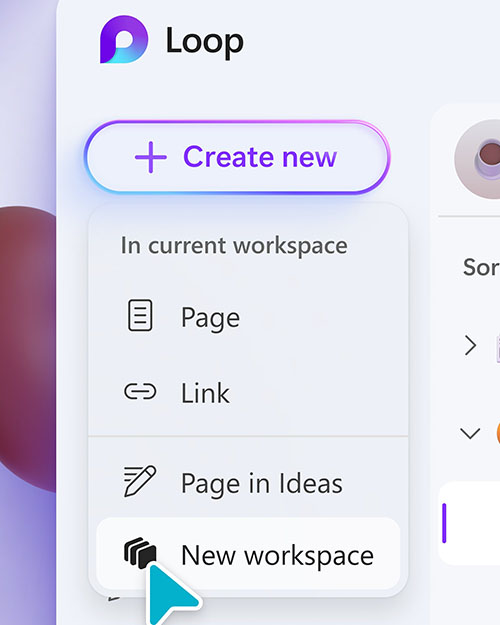
[Click on image for larger view.] Figure 1. You can see the new redesign, along with the revamped "Create" button.

New to 2.0, the Favorites tab offers access to frequently used workspaces, while the Recent tab allows users find their latest Loop pages and components, including those created in other Microsoft 365 apps like Teams, Outlook, OneNote and Whiteboard.

Microsoft has also added a Meeting Notes tab, which aims to keep users better organized. "For those of you on top of your game, you can even put in pre-read notes or agenda items for all of your upcoming meetings," tweeted Microsoft. "Or easily find your meeting notes from weeks ago!"
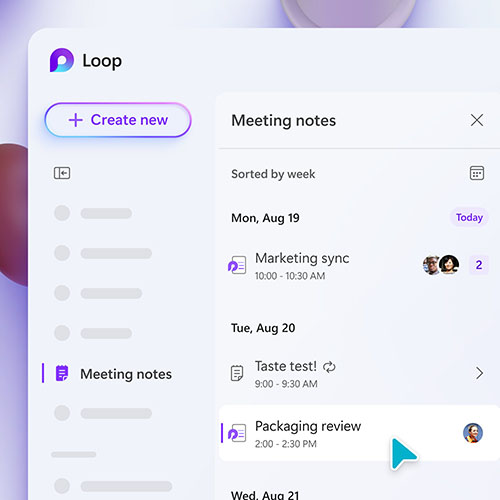
[Click on image for larger view.] Figure 2. The new Meeting Notes tab in Loop 2.0.

Microsoft has started a gradual rollout of Loop 2.0 and said that all users should "see it very soon."

For more information, visit the Microsoft Loop website.

About the Author

Chris Paoli (@ChrisPaoli5) is the associate editor for Converge360.

Featured

  • children using smart phones

    With Little Federal Guidance, States Take on Screen Time Themselves

    As an umbrella term, education technology encompasses everything from learning management systems and student information systems to productivity tools and AI platforms. More specific language clarifying the difference between ed tech and consumer-facing tools would allow state leaders to match the right evidence, expertise, and policy to the right questions.

  • Students using laptops in classroom

    Stop Asking Whether Students Can Use AI

    As generative AI has become embedded in the tools students use to search, write, create, translate, organize, and receive feedback, the boundary between "using AI" and "not using AI" has become increasingly difficult to define. More importantly, treating AI use as a binary choice does little to help students understand the different roles AI can appropriately play in learning.

  • Digital padlock

    Microsoft Expands AI Security Platform to Address Agentic AI Security Risks

    Microsoft is expanding the scope of its AI-powered Project Perception security platform to address the growing concern that AI agents may have access to sensitive information and systems, yet don't always behave as expected.

  • Businessman using a computer with digital graphics representing online IT help desk and technical support services.

    Study: Sign-In Problems Are Primary Drivers of Help Desk Tickets

    Sign-in problems account for up to 53% of help desk tickets at individual enterprises, but network issues can take significantly longer to resolve, according to a recent study from ControlUp.