Thinking Inside the Box
Discover how New York City's iSchool transformed a 19th century space into a true 21st century learning environment
- By Jennifer Demski
- 01/31/12
When we think of 21st century schools, we think of geometric modern architecture, sustainable building materials, and high-tech modular classrooms. It’s rare, though, that a district has the space or the money to build that school from the ground up. Instead, the challenge for most is the transformation of 20th century architecture to support a 21st century model of learning.
When iSchool Co-Principals Alisa Berger and Mary Moss were tapped by the New York City Department of Education to create a new high school whose curriculum incorporated technology and challenge-based learning modules, a 20th century building would have been a luxury. Yet, on the top two floors of a school built at the end of the 19th century in Manhattan’s SoHo, they worked within the building’s century-old limitations to develop a scalable model that rethinks what high school looks like in the 21st century.
The key was ensuring a truly robust online environment and working with the constraints of the building rather than against them. The following pages explore how iSchool is meeting the needs of its 21st century students.
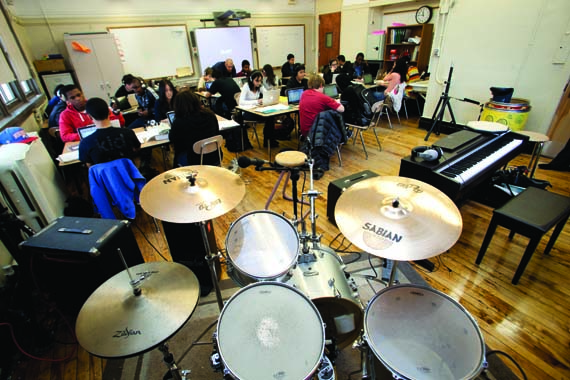
Big Band: There may only be space for a drum set and a piano, but students in a music composition class have access to every instrument they need, right on their laptop.
The Creative Commons: This multi-purpose space was modeled after the modern college library, which is no longer a quiet space but instead a hub of collaborative learning.
Public Space: “Learning is very public,” explains iSchool Principal Alisa Berger. “The Creative Commons is an area where teachers can send small groups of students to work on a project. If a teacher is having a one-on-one meeting with a student or a curriculum designer, it would happen right here.”
Shape-Shifter: Modular furniture allows this space to take on a number of roles throughout the day. Above, students in a drama class look on as their classmates rehearse for a production of “King Lear.” An hour later, the room is transformed into a cafeteria where 300 students will eat their lunch. Between the large multi-media displays on the wall at the left is a Cisco web cam that will be used for a large-group videoconference at the end of the school day.
Powerhouses: The Creative Commons also features three high-end desktop computers for students whose schoolwork requires the use of resource-hungry software or the transfer of large files over the school’s network. The three stations are designed to seat multiple students around each machine; the large displays make it easy for small groups of students to collaborate on photo and design assignments.
A Room With a View: In the iSchool’s distance learning classroom, students take a number of advanced placement courses taught by teachers elsewhere in the NYC school system. Above, an AP Chemistry teacher in the Bronx teaches iSchool students via a Cisco videoconferencing system, which iSchool technology coordinator Curtis Borg refers to as an “extraordinary” piece of equipment. Perhaps not as extraordinary as the oaken science file drawers under which it sits.
Adaptation: Rather than install a new equipment rack, Borg and his team transformed the classroom’s original coat closet into a secure, ventilated home for the Cisco videoconferencing system’s remote-controlled web camera.
Keeping Quiet: Like the Creative Commons, the Quiet Commons is a multi-purpose space designed to facilitate 21st century learning. Any collaboration that takes place in this quiet space, though, is happening on the web in individualized online coursework.
A Time for Tech: Students participating in a challenge-based learning module collaborate on the development of an interactive play based on “Othello.” Each classroom features a SmartBoard, projector, and 30 laptops on which students access their virtual desktops.
We Are Sixteen: The “We Are Sixteen” module, designed by iSchool teachers Christina Jenkins and Francesca Fay, explores global and anthropological perspectives on what it means to be 16 years old. Students hold videoconferences with teens around the world to discuss culture, geography, politics, and coming of age. This year, students are individually collecting footage on Flip cameras, which they will use to collaborate on an end-of-course documentary using iMovie software that will be screened in New York City. Low-tech solutions like whiteboard tables help students organize their ideas and think outside of the box.