Report Details 5 Keys to Using Technology To Help At-Risk Students
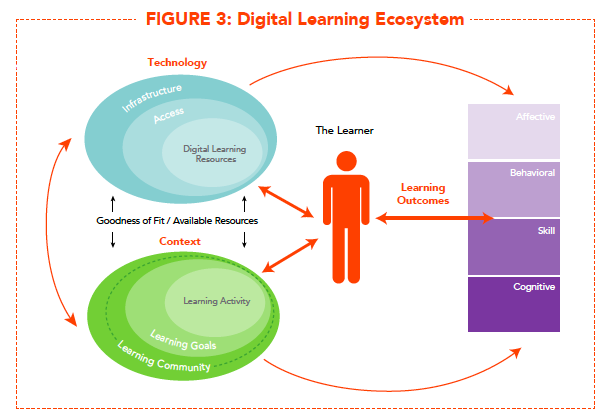
Today, the Alliance for Excellent Education and the Stanford Center for Opportunity Policy in Education released a report called “Using Technology to Support At-Risk Students’ Learning.” Written by Linda Darling-Hammond, Molly B. Zielezinski and Shelley Goldman, the report includes a review of the literature studying the impact of technology on at-risk students. Based on their research, the authors offer the following five recommendations:
1) Districts should aim for 1-to-1 computer access. According to the authors, “Studies finding positive impacts on student learning typically describe opportunities to learn where there is at least one device per student, and the devices are readily available for multiple uses by the student throughout the school day.”
2) Internet speed matters. The authors wrote, “In studies using technology for learning, at-risk students participating in blended and online courses recommended faster Internet connections as an important factor for improvement.”
3) At-risk students benefit most from highly interactive technology. The report stated, “Substantial research illustrates that activities supporting many kinds of interactions between learners and the material — including different visualizations of concepts; multiple ways of seeing, hearing and learning about them; and opportunities to be active in manipulating data, expressing ideas and other aspects of the learning process — were essential to support learning by lower-achieving and other at-risk students.”
4) Schools should encourage students to create their own content. The authors found that “when students have opportunities to create their own content using technology (for example, conducting research to make decisions or draw conclusions from evidence, finding and manipulating data, developing reports, creating websites, designing PowerPoint presentations and creating spreadsheets), they become more motivated and develop stronger skills.”
5) Blended learning works. The report concluded that the most productive blended environments “are those that combine structured learning of information with collaborative discussions and project-based activities that allow students to use the information to solve meaningful problems or create their own products, both individually and collectively.”
You can download the full report here.
About the Author
Christopher Piehler is the former editor-in-chief of THE Journal.