A New, Free App Helps Students Explore Social Learning
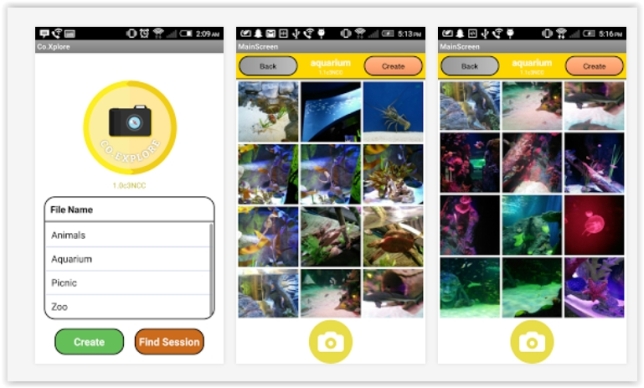
Our version of “social learning” focuses on activities where students learn with each other, where students solve problems with each other in the context of building artifacts and conversing all the while. There is a place for quiet, solo learning and solo problem solving, but more and more, educators (and businesspeople) are seeing the value of individuals learning together and working together to solve complex problems. And our research clearly indicates that the lower-performing students benefit greatly from this type of collaboration. To support social learning, we created a free app, Co.Xplore, which is available from the Apple App Store and the Google Play Store.
Co.Xplore joins the other social learning apps in our Co.llaboration Suite of collabrified productivity apps for K-12: Co.Map, Co.KWL and Co.Write are also available free on the Apple App store and the Google Play store.
How does Co.Xplore work? Let’s say that on a recent zoo trip, some students took pictures of the mammals and some students took pictures of the reptiles. Using Co.Xplore, every student could have all the pictures in a folder on their mobile device — all the pictures they took plus all the pictures that all the other students took. So the children who were only able to see the mammals won’t miss out on the reptiles..
In taking a specific photo, a student expresses his or her unique perspective. For example, in the zoo situation, one student might focus on the faces of alligators, while another student might focus on how alligators eat. Now, using Co.Xplore to view someone else's photos, every student can actually “see” what their fellow classmates “see”. Now that the students all have the photos they can begin to build their artifacts representing the zoo experience.
Look at the screens in the picture above. Relax; no, you aren’t seeing double! There are two screens, and both contain the same pictures. Some of the pictures were taken by a student who was operating the Co.Xplore window on the left; some of the pictures were taken by a student who was operating the Co.Xplore window on the right. Indeed, if there were three or even 30 students all using Co.Xplore at the zoo, each of the students would have all the pictures from the whole class.
We Need Your Help
Co.Xplore is definitely a version 1. It has been developed using the "agile method" of software development and is termed the MVP: minimally viable product. We need you all to try it out and tell us what feature Co.Xplore really needs. Should a student able to add a textual annotation to the image? Should a student be able to draw on the image? What else? You have the power to influence the development of Co.Xplore!
We understand that while school field trips provide children with invaluable experiences, many schools, due to budget cuts, have had to eliminate these trips from the curriculum. But students can use Co.Xplore productively in any setting.
For example, in an English lesson on prepositions, a teacher can create groups of three students and let each group stage a situation that illustrates prepositions such as "in," "on," "over," "under" or "above." The groups then take a photo of their staged situation using Co.Xplore. Since each group will have photos taken by all the other groups, the teacher can then have each group identify the preposition being illustrated in each of the photos.
Or how about a science lesson? In a lesson on birds and their habitats, the teacher could ask each student to use Co.Xplore to take photos of the birds they see around their school and around where they live. Back in the classroom, pairs of students could focus on describing the habitat of one or two birds using the pictures taken by the whole class.
These are just a couple of ideas. Now it's your turn: Tell us what you want your students to be able to do, and the undergraduate developers at the Intergalactic Mobile Learning Center will make it happen!
About the Authors
Cathie Norris is a Regents Professor and Chair in the Department of Learning Technologies, School of Information at the University of North Texas. Visit her site at www.imlc.io.
Elliot Soloway is an Arthur F. Thurnau Professor in the Department of CSE, College of Engineering, at the University of Michigan. Visit his site at www.imlc.io.
Find more from Elliot Soloway and Cathie Norris at their Reinventing Curriculum blog at thejournal.com/rc.