The Great Wall of Collaboration
Two educators tell stories of how using a widescreen interactive learning system gets students excited about sharing their work with their classmates.
- By Jessi Toups, Karen D. Owens
- 06/08/16
Every 21st-century teacher wants to encourage her students to collaborate. There are a slew of theories about how best to get students working together, but one key catalyst to collaboration is often overlooked: simple physical space. Here, two educators recount how their teaching and their students' learning changed when they all started using a 102-inch-wide interactive learning system.
Jessi Toups, 7th-grade teacher
I've been using the Promethean ActivWall for six months. Two things struck me in the transition from my previous interactive whiteboard: One was the size of the board, but my classroom also became very different in that the display has its own computer, so I no longer need a separate computer connected to my front-of-room display. This made almost all my lessons easier to pull up and run. I don't have to walk back and forth to the computer anymore. I can just open what I need straight from the display.
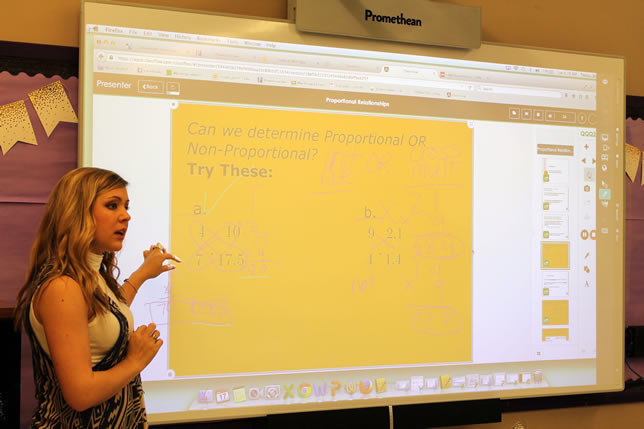
Jessi Toups uses a 102-inch-wide display in her classroom.
With my previous board, I could only see one student's work on my screen at a time. Now, I can mirror eight student responses from mobile devices to the main display to compare all sorts of answers. This is extremely beneficial in math when there is "more than one way to get there" with the answers!
Being able to mirror their work to the main display is an enormous incentive to the students in my room. My students can see the code they need to use to access the main display, and they know that when I am walking around and tell them they can mirror, that they did something right. This provides motivation to all students — no matter their level of understanding — to work harder for that completely correct answer and, of course, having their work shown off to the rest of the class really boosts their confidence.
My favorite story, however, is about a student who typically struggles in math. I do equation drills where I give students the questions rather quickly. The questions they must solve are in ClassFlow on the display. I throw candy to the first five students to mirror the correct answers, with all steps shown, to the wall. This struggling student normally does not win, but by being able to see her mistakes from her peers mirrored on the board and correcting them, she won twice. I was already extremely impressed, but when the bell rang for class to be over she stood up and shouted, "Ms. Toups, please give me more equations!" This is a sentence I never in my life thought I would hear.
Karen D. Owens, Library Technology Educator
In early February of this year, my school added an ActivWall 102 in our library media center. The wall was added to an instructional space that had existing laptops for student and teacher use, but did not have a whiteboard or other display space prior to this installation. We chose this particular space because it is centrally located and open to all teachers.
One of the greatest benefits from using an enormous collaborative surface with built-in software is the level of personal engagement the students have, both with each other and with the content. One prime example is a project that I helped our AP Psychology instructor develop and deliver. First, we developed a lesson during which students were working in teams to identify the specific functions and anatomy of various brain structures.
Using ClassFlow, we were able to differentiate the specific brain structures delivered to each student, so that each student had a different set of brain structures to research in the first class period. At the end of that first class period, students submitted responses to pre-developed prompts. During the next two class periods, students worked together to classify brain structures into systems and form expert teams for each brain system. For example, there was a team for the autonomic system, within which each individual student was an expert on one particular structure, and that team then worked together to synthesize the functions of each individual structure to show how each structure contributes to the function of the system as a whole. At this stage, each team was granted a period of time using the display to simultaneously mirror the students' individual research; this helped each team draw conclusions about the common functions of the structures in each system. Finally, on the final day of the project, each team presented their findings.
Students love that they can simultaneously view many resources and work at the board together to annotate the display. It helps them draw conclusions and clearly illustrate the basis for their conclusions. They can interact with the material to create a graphic organizer of sorts directly on the board.
Next year, we have a cohort of teachers who are committed to using our new front-of-class system on a consistent, ongoing basis. This group of teachers represents almost all subject areas, and the hope is that they will lead their departments in using the technology. A primary focus of my job is collaborating with teachers to meaningfully incorporate technology into their classes, and I will be partnering with each teacher in this group to that end. We are all very excited by the possibilities!
About the Authors
Jessi Toups is a 7th-grade teacher at Dutchtown Middle School in Louisiana.
Karen D. Owens is a library technology educator at Palmer High School in Colorado.