Accelerated Reader Student App Comes to iOS
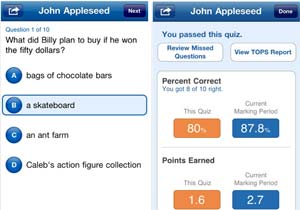
Accelerated Reader Student App runs on iPad, iPhone, and iPod touch devices.

Renaissance Learning has released a free iOS app that lets students take their Accelerated Reader quizzes on their iPads, iPhones, and iPods.

Accelerated Reader Student App works in conjunction with the hosted version of Accelerated Reader, a reading comprehension system that supports response to intervention through continuous monitoring of student comprehension, reading time, and practice, along with diagnostic reports for teachers. It also provides quizzes that are designed to help students measure their own progress.

With the new AR Student App, those quizzes can now also be accessed via iOS devices. The software--currently at version 1.0.1, though just formally announced this week--includes book search by title, author, and quiz number. It lets students access all of their quizzes and also allows them to view TOPS reports, which are detailed reports that track student objectives, results, and overall progress.

Other features of the new student app include:

  • Support for assessment restrictions, such as day and time restrictions for taking quizzes, and restrictions on where the quiz can be taken, such as only on the school's WLAN;
  • Support for logging in with current student user names and passwords; and
  • Printing of TOPS reports to iOS-supported printers.

Accelerated Reader Student App requires iOS 4.0 or higher. Additional details can be found on iTunes or on Renaissance Learning's AR Student App portal.

About the Author

David Nagel is the former editorial director of 1105 Media's Education Group and editor-in-chief of THE Journal, STEAM Universe, and Spaces4Learning. A 30-year publishing veteran, Nagel has led or contributed to dozens of technology, art, marketing, media, and business publications.

He can be reached at [email protected]. You can also connect with him on LinkedIn at https://www.linkedin.com/in/davidrnagel/ .


Featured

  • child stands with a laptop, in front of various drawings related to math and science

    Why Screen Time Limits Are Not the Answer

    At a fundamental level, screen time policies and laws aim to address academic achievement by balancing digital instruction with traditional teaching methods. But they do not tackle how devices are used.

  • Class CrunchLabs YouTube channel

    Mark Rober's Class CrunchLabs Courses Now Available for Free on YouTube

    Class CrunchLabs, the suite of free curriculum resources from NASA engineer turned YouTube science communicator Mark Rober, has released its first two courses on YouTube.

  • Neon blue security locks with a single red highlight

    With AI, Cybersecurity Focus Shifts from Finding Flaws to Fixing Them

    For decades, one of cybersecurity's biggest challenges has been finding vulnerabilities before attackers do. A growing number of security professionals now say artificial intelligence is changing that equation, shifting the focus from discovering flaws to fixing them quickly enough to prevent exploitation.

  • Wi-Fi icon on dark blue circuit background

    FCC to Conduct 'Top-to-Bottom' Review of E-Rate Program

    The FCC is laying the groundwork for a comprehensive review of its E-Rate program, the federal initiative that provides K–12 schools and public libraries with discounts on internet, WiFi, and telecommunications services to ensure equitable digital access.