How To Extract the Date from a URL in Google Sheets (or Any Spreadsheet)
This question comes up often in user forums: How do I extract a piece of information from one column and put that extracted information into another? For example, if I have a URL in one column, can I extract the date from that URL and put it in the date column so I don't have to add the date manually?
Why yes, you can.
Here it is in action in a sample spreadsheet. In this Sheet, I manually insert a URL in column B, and then the date is extracted in Column C.
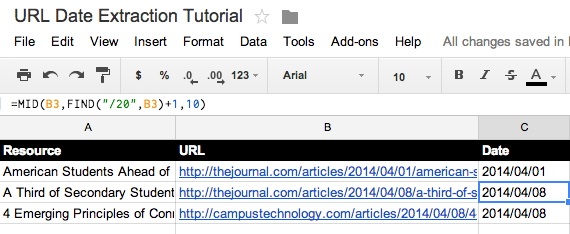
Sample Google Sheet showing the date extracted from a URL. |
This is a simple matter of using a not-so-simple formula, which you can see in the function field in the image above.
=MID(B3,FIND("/20",B3)+1,10)
That will extract the date from URLs like:
http://campustechnology.com/articles/2014/04/08/4-emerging-principles-of-connected-learning.aspx
or
http://thejournal.com/articles/2014/04/08/a-third-of-secondary-students-use-school-issued-mobile-devices.aspx
Actually it's pretty simple for you because all you have to do is copy and paste it into your spreadsheet and then modify it slightly to make it function properly. (Incidentally, while this tutorial is about Google Sheets, this formula will also work in LibreOffice and other spreadsheets.)
Here's what this means:
Parsing the Date Extraction Formula
| Term |
Description |
| =MID( |
This is the operator. You need this part. |
| B3, |
This is the specific cell we're referencing (column B, row 2). Modify this to suit your needs. |
| FIND( |
Here we're saying we need to look for some specific text. |
| "/20", |
This is the specific text we want to find. This is arbitrary in my case. I could have used "/articles/" or "icles/" or any other portion of the URL common to all of my URLs. |
| B3) |
Here we're restating the cell in which the text appears. |
| +1 |
This means I will exclude the first character in the searched text (the "/" in this case) when displaying the final result. If my search text had been "/Articles/," this number would be +10. |
| ,10) |
This is the number of characters to be displayed from the starting point, which is 10 (for example, "2014/04/08"). If you wanted to display a slash at the end, you'd make this number 11. If you wanted to include only the year and the month, you'd make this number 7 (to exclude the "/08"). |
Now play around with it using your own URLs. If you run into any trouble, ask me a question in the comments section below.