RGS Debuts Ruggedized Chromebooks for Schools
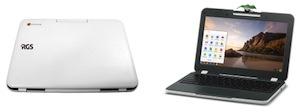 RGS has launched the RGS Education Chromebook, a ruggedized Chromebook designed for use in the classroom.
"Built to handle the challenges of maintaining sensitive technology appliances in an active and demanding classroom environment, the RGS Education Chromebook features a 9.5-hour battery life, plastic bumper, water resistant keyboard and anti-peel keyboard keys, and is designed to withstand a fall from a standard-height student desk (70 cm)," according to a news release.
Each RGS Education Chromebook weighs less than three pounds, is PARCC and Smarter Balanced compliant and comes with a magnification lens that can snap onto the reversible camera to turn the device into a microscope for use in STEM education.
Features of the RGS Education Chromebook include:
- 4th generation Intel Celeron processor;
- Wi-Fi 802.11 ac/a/b/g/n 2x2;
- Bluetooth 4.0;
- 2GB and 4GB RAM versions;
- An 11.6-inch display with 1,366x768 resolution;
- A Google Chrome Management Console license;
- Google Drive cloud storage;
"As schools make the transition to more technology-enabled classrooms, they have discovered that there is a big difference between using commercially available computers and deploying systems built specifically to facilitate digital learning," said Scott MacDonald, vice president and general manager at RGS, in a prepared statement. "The RGS Education Chromebook is designed to provide the durability to withstand the hazards of K-12 classroom use, as well as ease-of-use and learning-centric functionality districts require, with a lower cost of ownership and all the associated support services needed to not only optimize system performance and instruction time, but to support the ultimate goal of improving learning outcomes."
More information is available at avnetrgs.com.
About the Author
Joshua Bolkan is contributing editor for Campus Technology, THE Journal and STEAM Universe. He can be reached at [email protected].