Enhanced i>clicker+ with Braille Buttons Set for Fall Rollout
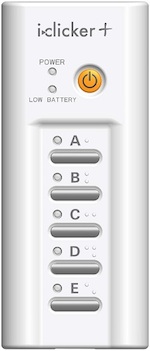
>clicker+ will add an improved keypad with Braille characters.
i>clicker+ will add an improved keypad with Braille characters.

Macmillan New Ventures' i>clicker unit is rolling out an enhanced version of its student response device this fall.

i>clicker is a line of classroom response devices for K-12 and higher education that includes the original i>clicker, the LCD i>clicker 2, and the web>clicker mobile edition for iOS, Android, Blackberry, and webOS. Those devices work with the core i>clicker software to deliver formative assessments, polls, and other types of classroom interactions between instructors and students. The free desktop software for Mac OS X and Windows includes graphing capabilities and other forms of poll data management, anonymous polling, satellite polling, PowerPoint support, gradebook, and Excel export, among other features. The software integrates with major learning management systems, including Blackboard, Angel, WebCT, Desire2Learn, Sakai, and Moodle.

The new version of the classroom clicker is designed along the same lines as the original i>clicker remote. It lacks the LCD screen of the higher-end i>clicker 2 but will be designed to match more closely the look and feel of the i>clicker 2, according to the company.

The new model will be smaller than the original, measuring 4.65" (L) x 1.98" (W) x 0.67" (D) and weighing in at 2.9 ounces. Enhancements coming to the i>clicker+ include:

  • Braille characters on the A through E buttons;
  • Improved labeling of buttons;
  • A recessed power button;
  • LED lights adjacent to each button for poll confirmation; and
  • Two AAA battery operation (down from three batteries).

The i>clicker+ is expected to ship in October 2012. Pricing has not been announced. Additional details are available on i>clicker's site.

About the Author

David Nagel is the former editorial director of 1105 Media's Education Group and editor-in-chief of THE Journal, STEAM Universe, and Spaces4Learning. A 30-year publishing veteran, Nagel has led or contributed to dozens of technology, art, marketing, media, and business publications.

He can be reached at [email protected]. You can also connect with him on LinkedIn at https://www.linkedin.com/in/davidrnagel/ .


Featured

  • elementary schoolchildren using digital tablet in classroom

    CoSN: 3 Principles that Should Guide Screen Time Policies in Schools

    CoSN, the professional association for K-12 education technology leaders, has released new guidance to help schools navigate the screen time debate and develop technology policies that protect students while supporting learning.

  • Graduation cap with a lightbulb on the book and icon learning in the classroom.

    Department of Education Issues New Guidance on Education Technology and Screen Time

    In an Aug. 20 Dear Colleague Letter from Kirsten Baesler, assistant secretary of the United States Department of Education's Office of Elementary and Secondary Education, ED outlines new guidance to frame the national conversation around the educational value of technology in schools.

  • Man types on laptop in data center

    Microsoft Announces General Availability of Point-in-Time Restore for Windows 11

    Microsoft has made point-in-time restore generally available for Windows 11, giving users and IT administrators a built-in way to roll back PCs after bad updates, driver problems, app corruption, or other problems.

  • abstract smartphone translucent screen displaying AI interface

    Apple Unveils Redesigned Siri AI

    At its recent Worldwide Developers Conference, Apple announced Siri AI, a redesigned version of its voice assistant that Apple describes in its own announcement as "a profoundly more capable and personal assistant." The update is intended to make Siri more conversational, more context-aware, and more useful across iPhone, iPad, Mac, Apple Watch, and Vision Pro.